


Bookcamp: Audiobooks for Plex
4.1131.00 Reviews
App Specs
- Version
- 2.1.2
- Updated On
- License
- Free
- Downloads
- 10,000+
- Developer
- Bookcamp
- Categories
- Books & Reference
- Platform
- Android
Screenshots

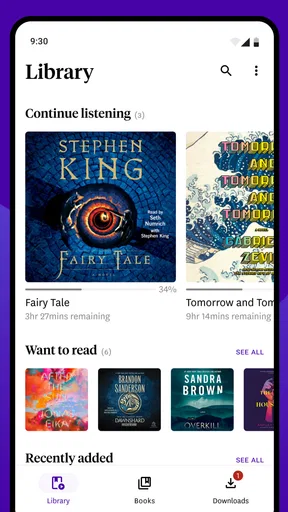
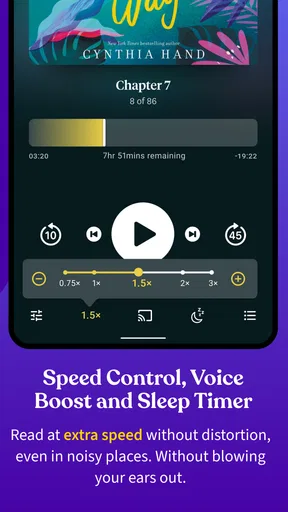
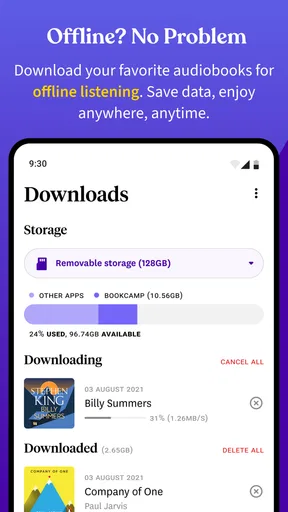
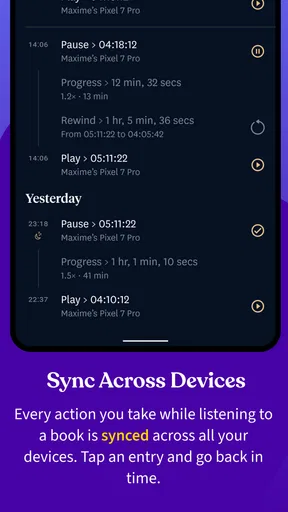
 Analysis by AppCompare
I came away from Bookcamp: Audiobooks for Plex with a fairly clear impression: it is most appealing when you already think of your audiobook collection as something you own and organize, rather than something you simply stream from a large commercial catalog. The app sits in the Books & Reference category and is made by Bookcamp, with a practical focus on reaching your audiobooks across devices. That makes it a different kind of proposition from the usual audiobook subscription service.
My recommendation is therefore conditional, but positive. If your personal library is connected to Plex and you want a mobile listening experience built around that collection, Bookcamp deserves a serious look. If you want instant access to a huge selection of narrated books, editorial recommendations, or the simplest possible setup, a conventional audiobook platform will probably feel more natural.
What using Bookcamp feels like in everyday listening
The first thing I noticed is that the app’s value depends on the relationship between the listener and the library. It is not trying to replace the idea of a personal media server. Instead, it gives that idea a more convenient listening surface on a phone or another supported device. In practice, that means the app makes the most sense after you have already invested time in arranging your audiobook collection through Plex.
That distinction matters because many audiobook apps begin with discovery. They present a storefront, suggest titles, sell individual books, or encourage a subscription. Bookcamp begins from the opposite direction: the books you already have available through your own setup. I found that approach refreshing because it puts control in the hands of the listener, but it also means the app cannot rescue a disorganized library. Your experience will reflect how carefully your Plex collection is named, sorted, and maintained.
A realistic example is a commuter who has gradually built a collection of language courses, novels, and nonfiction audiobooks. At home, those files may be comfortable to manage through a Plex-based library. On the way to work, the phone becomes the important part of the experience. Bookcamp is useful in that gap: it turns a home-centered collection into something that is easier to reach while away from the main screen.
I also see a strong use case for people who move between devices. The store summary describes access to audiobooks on any device and anywhere, and that idea is central to the app’s appeal. Rather than treating a phone as an isolated download folder, Bookcamp fits a listening habit that follows the user. That can be especially helpful for someone who listens in several places during the day and does not want to maintain separate copies of the same material.
Still, I would not describe the setup as completely effortless for everyone. The app is most comfortable for users who understand the basic logic of a Plex library. If terms such as server, library organization, and remote access already sound familiar, the concept is easy to appreciate. If you simply want to install an app, search for a title, and press play without thinking about the underlying collection, the appeal is narrower.
Worth Reading Before You Choose

EA SPORTS FC Mobile 26 Is a Bigger Football Game, but It Takes Time

Flipboard Shows What News Apps Must Do Beyond the Feed

Switching to Android Auto Means Rethinking Your Driving Routine

Google Calendar Makes a Crowded Week Easier to Manage

Ludo King Makes the Most of the Minutes Between Plans

Baby Panda World Brings Quick Play to Modern Phones, but Its Game Library Feels Busy
The strongest reason to choose it
The strongest part of Bookcamp is its focus. It does not need to be everything at once. By centering the experience on audiobooks associated with Plex, it serves listeners who want a bridge between personal media management and mobile playback. That is more useful than a generic promise of convenience because it addresses a specific problem: making a self-managed audiobook library practical away from home.
I especially like the ownership angle. With a normal audiobook storefront, your listening history is tied closely to that service’s catalog and account. With a Plex-centered workflow, your collection remains the starting point. This does not automatically make the experience better, but it gives you a different kind of flexibility. You can think in terms of your own shelves, your own listening priorities, and the books you have deliberately gathered.
That approach also makes Bookcamp a good companion for long-form listening. People who keep several unfinished books in rotation may appreciate being able to return to a personal collection instead of browsing a commercial catalog every time. A history book for weekends, a novel for commuting, and a practical title for short evening sessions can all belong to the same broader library. The app’s usefulness comes from reducing the distance between those choices and the listening moment.
Another non-obvious strength is that it encourages better library discipline. When an audiobook collection is only used on one computer, messy names or inconsistent organization can remain hidden. Once you want to browse it from a phone, those problems become obvious. In my view, Bookcamp can motivate users to clean up their Plex structure because a well-arranged library becomes much more valuable when it is available during everyday routines.
My practical tip is to treat the library as part of the listening experience, not as background administration. Before relying on Bookcamp for a trip or a busy week, I would check that the books I want are easy to identify and that the relevant parts of the Plex setup are reachable. That small preparation can prevent the frustrating situation of knowing a book is somewhere in the collection but not being able to find it quickly when there is only a few minutes available to listen.
Where the experience can become frustrating
The meaningful weakness is that Bookcamp inherits some of the complexity of a personal Plex arrangement. A commercial audiobook app usually hides the technical side. You search, choose a title, and let the service handle the rest. With Bookcamp, the quality of the experience depends more heavily on the environment around the app. A poorly organized collection or an unreliable connection can make the whole process feel less polished, even if the app itself is behaving as intended.
This is the trade-off behind the app’s main strength. Control and personal ownership are attractive, but they require more responsibility. You may need to think about how your books are arranged, whether the server is available, and how your listening habits fit the way that library is maintained. For me, that is acceptable because I like the personal-library model. For a reader who considers any setup work an annoyance, it may outweigh the benefits.
I would also be careful about assuming that a Plex-based audiobook app offers the same discovery experience as a major audiobook marketplace. The point here is access to your collection, not necessarily an endless stream of recommendations or a polished sales ecosystem. If you depend on editorial lists, new-release browsing, narrator exploration, or one-tap purchasing, Bookcamp is unlikely to be your complete audiobook solution.
The cost structure is worth understanding as well. The app is free to install, but it includes in-app purchases ranging from $1.99 to $49.99 per item. That does not make the app automatically poor value, but it does mean I would look carefully at what part of the experience requires payment before making it my main listening tool. A free entry point is useful for testing whether the Plex workflow suits you, while the range of available purchases means users should decide based on their own usage rather than assuming every function is included.
My advice is to test the app with a small, familiar part of your library first. Choose a book you know well, use it during the kind of routine where you normally listen, and see whether the transition from your Plex collection to mobile listening feels natural. This is a better test than judging the app only from its store page because the central question is personal: does your existing library become easier to use?
Who will get the most from it
Bookcamp is a strong fit for listeners who already use Plex and have a meaningful audiobook collection. It is also well suited to people who prefer maintaining their own media rather than depending entirely on a subscription catalog. If you have spent time collecting books legally and want a more mobile way to reach them, the app’s purpose is easy to understand.
It may also suit households or individuals with varied listening habits. A personal collection can contain older titles, niche subjects, recordings purchased elsewhere, and books that are no longer prominent in commercial storefronts. A service built around discovery may not make those titles central, whereas a library-focused app gives them a place alongside everything else you keep.
Another good audience is the technically comfortable listener who wants a unified routine. Instead of copying files manually between devices, that user can build a central audiobook collection and use Bookcamp as part of the access layer. The benefit is not flashy; it is the gradual reduction of small inconveniences that otherwise interrupt listening.
I would recommend skipping it if you do not use Plex, do not have a personal audiobook library, or have no interest in managing one. In those cases, the app’s central idea will feel like extra work rather than a solution. I would also point frequent audiobook shoppers toward a traditional marketplace if their priority is finding and buying the next title quickly. Bookcamp is better understood as a companion for an existing collection than as a replacement for every audiobook service.
Compatibility, maturity, and value
The app is available for users on an operating system version nine or later, which gives it a reasonably broad starting point for compatible devices. Its current version is 2.1.2, and the project has been available since August 13, 2021. I read those details as signs of an app that has had time to establish its basic direction, while still being specific enough that prospective users should judge it by the Plex workflow rather than by expecting a giant all-purpose platform.
Bookcamp has an average rating of 4.1 from around 442 ratings and 131 written reviews. That is a useful indication that the concept resonates with a real group of users, although the audience is naturally more specialized than the audience for a mainstream reading app. It has passed 10 thousand installs, which also fits the impression of a focused tool serving a defined community rather than trying to compete with the largest entertainment services.
The Everyone content rating makes the app approachable for general audiences. That does not say anything about the themes of the audiobooks in a user’s own collection, of course; those depend on what each listener stores and plays. The important point is that the application itself is positioned as a general Books & Reference tool, not as a narrowly age-targeted entertainment product.
When I compare Bookcamp with the usual alternatives, I see three different priorities. A subscription audiobook service is generally better for discovery and immediate catalog access. A basic file player is often simpler for a small local collection. Bookcamp occupies the middle ground: it is more connected and organized than manually opening individual files, but it asks more from the user than a fully managed commercial service.
That middle position is not a weakness by itself. In fact, it is the reason I would recommend it to the right person. The mistake would be choosing it while expecting a storefront, a social reading network, and a personal media server to behave identically. Bookcamp works best when you value the Plex connection enough to accept the responsibilities that come with it.
My verdict for potential users
After looking at the app as a daily listening tool rather than just a way to access audiobooks, I think Bookcamp succeeds because it has a clear purpose. It gives Plex users a practical route to their personal audiobook collections and makes a self-managed library feel less tied to one room or one computer. That is a meaningful benefit for the right audience.
Its limitations are equally clear. The experience is not as effortless as a commercial audiobook service, and it is not aimed at people who want the app itself to provide a massive catalog. The free download lowers the barrier to trying it, while the in-app purchase range means I would inspect the available options before committing to a long-term workflow.
My final recommendation is straightforward: install Bookcamp if you already use Plex, care about your own audiobook library, and want that collection to travel with you. Start with one familiar book, tidy the library around the way you actually browse, and test it during a normal commute or evening routine. The app is at its best when it removes friction from a library you already own, not when it is asked to replace the entire audiobook world.
For those users, Bookcamp is a focused and sensible choice from Bookcamp. For everyone else, a conventional audiobook marketplace or a simpler local player may be the better fit. I would not recommend it universally, but I would recommend it confidently to anyone whose listening life already revolves around Plex.
Pros
- Uses your existing Plex library instead of requiring a separate audiobook service.
- Keeps audiobook playback organized alongside your other Plex media.
- Supports remote access when your Plex server is configured correctly.
- Useful for households already familiar with Plex accounts and profiles.
- Can reduce reliance on multiple audiobook apps and subscriptions.
Cons
- Requires access to a Plex Media Server with properly tagged audiobook files.
- Setup may be confusing for users unfamiliar with Plex libraries and permissions.
- Playback quality depends heavily on your server connection and home upload speed.
- Features may feel limited compared with dedicated audiobook apps.
- Server downtime or indexing issues can temporarily make books unavailable.
FAQs for Bookcamp: Audiobooks for Plex
What is Bookcamp: Audiobooks for Plex?
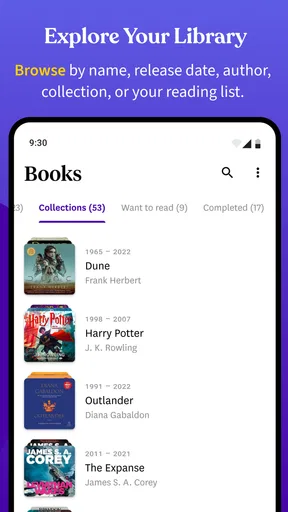
Bookcamp: Audiobooks for Plex is a mobile audiobook player designed to work with a personal Plex Media Server. After connecting to your Plex library, the app lets you browse audiobook collections, view available metadata, stream titles, and manage playback from a phone or tablet. It is mainly intended for users who already store and organize audiobooks through Plex rather than people looking for a standalone audiobook subscription service.
Do I need a Plex Media Server to use Bookcamp?
Yes, Bookcamp is primarily a companion app for a Plex-based audiobook library, so you generally need access to a running Plex Media Server containing your audiobook files. You may also need a Plex account and suitable server permissions, depending on how your library is configured. The app is not designed to replace Plex or provide its own catalog of commercially available audiobooks.
Can I listen to audiobooks offline with Bookcamp?
Offline listening depends on the app’s available download features, your Plex setup, and the permissions associated with your account. If downloading is supported for your configuration, you can save compatible audiobook content to the device before traveling or leaving a Wi-Fi connection. Users should verify storage requirements, download controls, and whether playback remains available after disconnecting from the server.
Does Bookcamp support audiobook progress, chapters, and playback controls?
Bookcamp is built around audiobook listening rather than ordinary music playback, so features such as resume position, chapter navigation, sleep controls, playback speed, and lock-screen controls may be especially important. The exact experience can depend on the audiobook’s file structure and metadata in Plex. Properly organized files usually provide a smoother browsing and chapter-selection experience.
Is Bookcamp: Audiobooks for Plex free to download and use?
The download price and available features may vary by platform, version, or optional in-app purchases. Before installing, check the official App Store or Google Play listing for current pricing, subscription details, and supported devices. Also remember that using Bookcamp may involve separate Plex requirements, server hardware, network access, and possible Plex-related costs that are not necessarily included with the app.


